
本期教大家美化RiPro主题首页幻灯片的大小修改,并附上设置教程,帮助新手快速掌握RiPro主题的相关设置与美化,展示效果可参考截图,感谢大家的支持!

1.打开:“/ripro/parts/home-mode/slider.php”文件,子主题也可参考本路径。
2.打开“slider.php”文件,并全部替换修改如下代码:(也可下载附件直接替换)
[wm_login]
<?php
$mode_slider = _cao('mode_slider');
ob_start(); ?>
<?php if ($mode_slider['diy_slider']) : ?>
<div class="section">
<div class="container">
<div class="module slider big owl nav-white<?php echo esc_attr( $mode_slider['autoplay'] ? ' autoplay' : '' ); ?>">
<?php foreach ($mode_slider['diy_data'] as $key => $item) {
echo '<article class="post lazyload visible" data-bg="'.esc_url( $item['_img'] ).'">';
echo '<div class="container">';
echo '<a'.( $item['_blank'] ? ' target="_blank"' : '' ).' class="u-permalink" href="'.esc_url( $item['_href'] ).'"></a>';
echo '</div>';
echo '</article>';
} ?>
</div>
</div>
</div>
<?php else : ?>
<?php
$args = array(
'cat' => $mode_slider['category'],
'ignore_sticky_posts' => true,
'post_status' => 'publish',
'posts_per_page' => $mode_slider['count'],
'offset' => $mode_slider['offset'],
'orderby' => $mode_slider['orderby'],
);
$data = new WP_Query($args);
if ($mode_slider['is_styles_rand']) {
$mode_slider_style = mt_rand(0,1);
}else{
$mode_slider_style = $mode_slider['styles'];
}
?>
<?php if ($mode_slider_style == '1') : ?>
<div class="section">
<div class="container">
<div class="module slider big owl nav-white<?php echo esc_attr( $mode_slider['autoplay'] ? ' autoplay' : '' ); ?>">
<?php while ( $data->have_posts() ) : $data->the_post();
$bg_image = wp_get_attachment_image_src( get_post_thumbnail_id( get_the_ID() ), 'full' );
$bg_image_src = ($bg_image) ? $bg_image[0] : _the_theme_thumb_full();
?>
<article <?php post_class( 'post lazyload visible' ); ?> data-bg="<?php echo esc_url( $bg_image_src ); ?>">
<div class="entry-wrapper">
<?php cao_entry_header( array( 'tag' => 'h2', 'link' => false, 'white' => true, 'category' => true,'author'=>true ) ); ?>
<?php if ( $_get_excerpt = _get_excerpt(120) ) : ?>
<div class="entry-excerpt u-text-format">
<?php echo $_get_excerpt; ?>
</div>
<?php endif; ?>
<?php get_template_part( 'parts/entry-footer' ); ?>
</div>
<a<?php echo _target_blank();?> class="u-permalink" href="<?php echo esc_url( get_permalink() ); ?>"></a>
</article>
<?php endwhile; ?>
</div>
</div>
</div>
<?php else : ?>
<div class="section bgcolor-fff pt-0">
<div class="module slider center owl<?php echo esc_attr( $mode_slider['autoplay'] ? ' autoplay' : '' ); ?>">
<?php while ( $data->have_posts() ) : $data->the_post();
$bg_image = wp_get_attachment_image_src( get_post_thumbnail_id( get_the_ID() ), 'full' );
$bg_image_src = ($bg_image) ? $bg_image[0] : _the_theme_thumb_full();
?>
<article <?php post_class( 'post lazyload visible' ); ?> data-bg="<?php echo esc_url( $bg_image_src ); ?>">
<div class="entry-wrapper">
<?php cao_entry_header( array( 'tag' => 'h2', 'link' => false, 'white' => true, 'category' => true ,'author'=>true) ); ?>
<?php if ( $_get_excerpt = _get_excerpt(120) ) : ?>
<div class="entry-excerpt u-text-format">
<?php echo $_get_excerpt; ?>
</div>
<?php endif; ?>
<?php get_template_part( 'parts/entry-footer' ); ?>
</div>
<a<?php echo _target_blank();?> class="u-permalink" href="<?php echo esc_url( get_permalink() ); ?>"></a>
</article>
<?php endwhile; ?>
</div>
</div>
<?php endif;?>
<?php endif; ?>
<?php
wp_reset_postdata();
echo ob_get_clean();
[/wm_login]
3.打开WordPress后台:找到“RiPro主题设置”→“首页设置”→“幻灯片模块”,找到“自定义全屏幻灯片图片和链接”,将其打开,然后自定义幻灯图片即可。
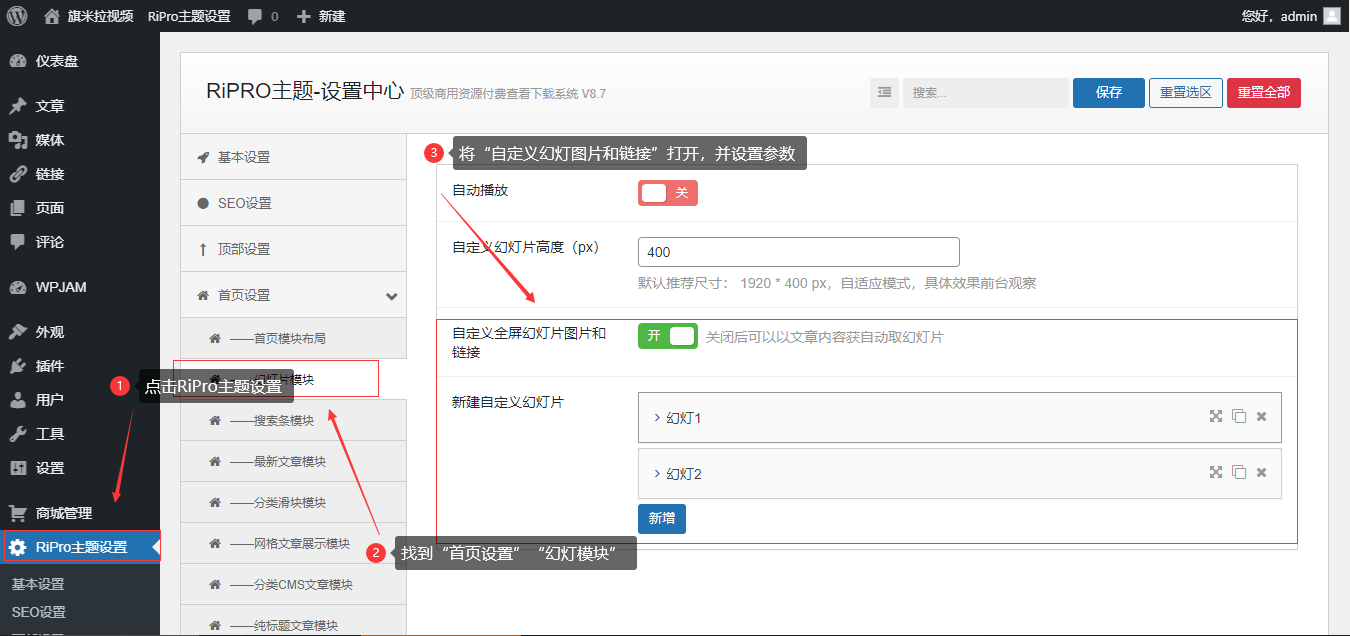
4.幻灯片像素大小推荐为:“1170像素×400像素”
本站声明:
1. 本站所有资源来源于网络,分享目的仅供大家学习和交流! 2. 不得使用于非法商业用途,不得违反国家法律。否则后果自负! 3. 本站提供的资源,都不包含技术服务请大家谅解! 4. 如有链接无法下载、失效或广告,请联系站长处理!
再次声明:如若本站内容侵犯了原著者的合法权益,可联系我们进行处理。